See your Pylontech battery from anywhere in the world.
PylonCheck (Pylon-Check) plugs into the CONSOLE port of your Pylontech battery, joins your WiFi and streams everything to your private cloud dashboard: state of charge, every cell, temperatures, BMS alarms and years of history — on your phone, from the office, from holiday. Pylontech monitoring and diagnostics for 45 €, no subscription.
- Cloud dashboard included, no subscription
- Set up in 2 minutes, no app to install
- US2000 · US3000 · US5000 · Force — up to 16 batteries
- Home Assistant · MQTT · JSON · Jeedom
45 €incl. RJ45 console cable + USB-C cable
From the battery to your phone, in four hops
PylonCheck reads the battery management system (BMS) through the service port every Pylontech has, then pushes the data to the cloud over your home WiFi. Nothing to open on your router, no VPN, no port forwarding.
Plug in two cables
The labelled RJ45 cable goes into the CONSOLE port of your master battery, the USB-C cable into any 5 V USB charger. Both cables are in the box.
Join your WiFi
On first power-up the box opens its own setup WiFi. Pick your network, type the password — the page opens by itself on your phone.
Open your dashboard
Link the box to your account and your battery appears in the cloud: live values, cells, alarms and a history that keeps building for years.
Your Pylontech, live — wherever you are
Most Pylontech owners only see their battery through an inverter app that shows one number: the state of charge. PylonCheck shows you what the BMS actually knows, keeps it, and warns you when something drifts.
Live from anywhere
State of charge, power, voltage, current and status refresh every two minutes in a private dashboard you open from any browser, anywhere in the world.
Years of history
Every reading is kept: raw for 7 days, 5-minute averages for 90 days, hourly averages for 3 years. Zoom from today to last winter.
Offline alert by email
If your box stops reporting for 6 hours — power cut, WiFi down, cable pulled — you get an email. The one thing a battery can never tell you itself.
Cell-balance advice
PylonCheck watches the gap between your highest and lowest cell against the pack's own normal, and tells you when and why it widens — usually a missing full charge.
CSV export
Download your history per battery as CSV for a spreadsheet, a warranty claim or your installer.
Private share link
A private JSON URL of your live data, for a friend, your installer or your own scripts. Off until you turn it on.
Everything the BMS knows, not just the percentage
The CONSOLE port is the Pylontech service interface. PylonCheck polls it gently every few seconds and decodes the answers into readable values, battery by battery.
- Charge: SOC, voltage, current, power, charging / discharging / idle
- Health: State of Health (SOH), cycle count, remaining capacity
- Cells: every cell voltage, min / max and spread (Δ mV)
- Temperatures: cells, BMS / MOSFET, lowest and highest
- Alarms: BMS status and protection flags, per battery
- Stacks: up to 16 chained batteries shown one by one

Home Assistant, MQTT, JSON, Jeedom — built in
The cloud is for when you are away. At home, PylonCheck also speaks to your own systems directly on your network, even if the internet is down.
Home Assistant
MQTT auto-discovery: the sensors appear by themselves under one device, no YAML.
MQTT
Retained topics for the whole stack and for each battery, to any broker.
JSON API
One GET on /api.json returns the full battery state for Node-RED, openHAB, Domoticz or your scripts.
Jeedom
Through MQTT or the JSON API — the same data, in your Jeedom dashboard.
What PylonCheck does today
| Area | What you get | Status |
|---|---|---|
| Cloud dashboard | Live values, per-battery detail, history, offline alerts, balance advice, CSV | Available |
| Connection to the battery | CONSOLE port (RJ45, RS-232), cable included | Available |
| Network | WiFi 2.4 GHz, outbound connection only | Available |
| Low-voltage Pylontech | US2000, US2000C, US3000C, US5000, UP2500, Force L1 — up to 16 in one stack | Available |
| High-voltage Pylontech | Force H2 / H48050 through the BMS console | Early installs — ask us |
| Home Assistant / MQTT / JSON / Jeedom | Local, no cloud needed | Available |
| Local web dashboard | On your network, works without internet | Available |
| Writing to the BMS | PylonCheck is read-only by design: it never changes a BMS setting | Not offered |
Everything included, for 45 €

PylonCheck
VAT not applicable, art. 293 B CGI · shipping calculated at checkout
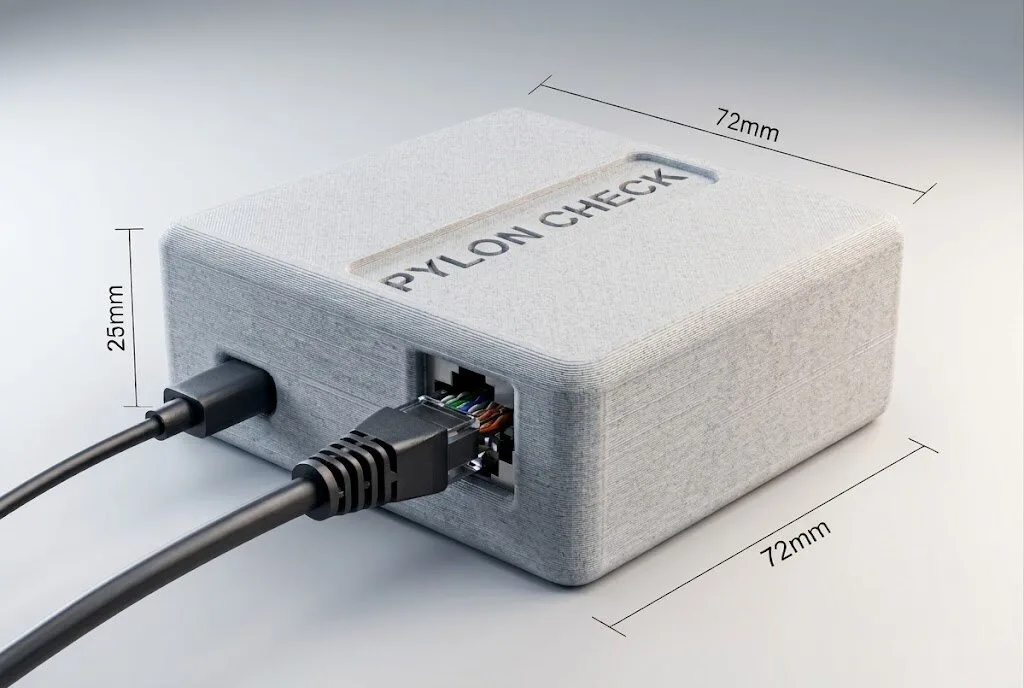
- The PylonCheck box (72 × 72 × 25 mm)
- Labelled RJ45 console cable for your battery
- USB-C cable (use any 5 V USB charger)
- Cloud dashboard with 3-year history — no subscription
- Offline and cell-balance email alerts
- Home Assistant, MQTT, JSON and Jeedom
- Free over-the-air updates
- 2-year warranty, 14-day return
Ships from France within 1–3 business days · tracked delivery
A small French maker, not a faceless platform
We make one thing: a simple way to see what a Pylontech battery is really doing, from anywhere, without a subscription. No investors to please, no reseller in the middle — which is why it costs 45 €.
— The PylonCheck team — Deuil-la-Barre, France
- Assembled in FranceEach box is put together and checked in our workshop in the Val-d'Oise before it ships.
- You write to a person[email protected] is read by the people who build the box and write its software — in English or French.
- Sold directNo marketplace, no distributor margin: from us to you, tracked from France.
Frequently asked questions
What is PylonCheck?
PylonCheck (Pylon-Check) is a small WiFi box (72 × 72 × 25 mm) that connects to the CONSOLE port of a Pylontech battery and sends its data to a cloud dashboard, so you can see your Pylontech battery from anywhere in the world. It also exposes the data locally for Home Assistant, MQTT, a JSON API and Jeedom. It costs 45 € with both cables, and there is no subscription.
Do I need a subscription for the cloud?
No. The cloud dashboard, the 3-year history, the offline alerts and the CSV export are included in the 45 € price.
Which Pylontech batteries are supported?
The low-voltage range — US2000, US2000C, US3000C, US5000, UP2500 and Force L1 — up to 16 batteries chained in one stack. High-voltage Force H2 / H48050 systems are supported by the firmware through the BMS console; tell us your setup before ordering so we can confirm it.
Does it work with my inverter?
Yes, whatever the inverter. PylonCheck uses the CONSOLE port, which is separate from the CAN / RS485 link your inverter uses, so the inverter connection is not touched.
Is it WiFi or Ethernet?
WiFi (2.4 GHz). The RJ45 socket on the box is for the battery console cable, not for a network cable.
Can PylonCheck change settings in my battery?
No. PylonCheck only reads. It never writes to the BMS, which is the safest choice for a battery that holds several kilowatt-hours.
What happens if my internet goes down?
The box keeps working locally: the local dashboard, Home Assistant, MQTT and the JSON API do not need the internet. The cloud catches up once the connection is back, and if the box stays silent for 6 hours you receive an email.
Is it Pylon-Check or PylonCheck?
Both spellings are used for the same box: PylonCheck, Pylon-Check or Pylon Check — sold at pylon-check.com, 45 €, cloud included.
Your battery, from anywhere. For 45 €.
Cloud dashboard, history, alerts, Home Assistant and MQTT included. No subscription.